The Optimal Path

Through Your Work

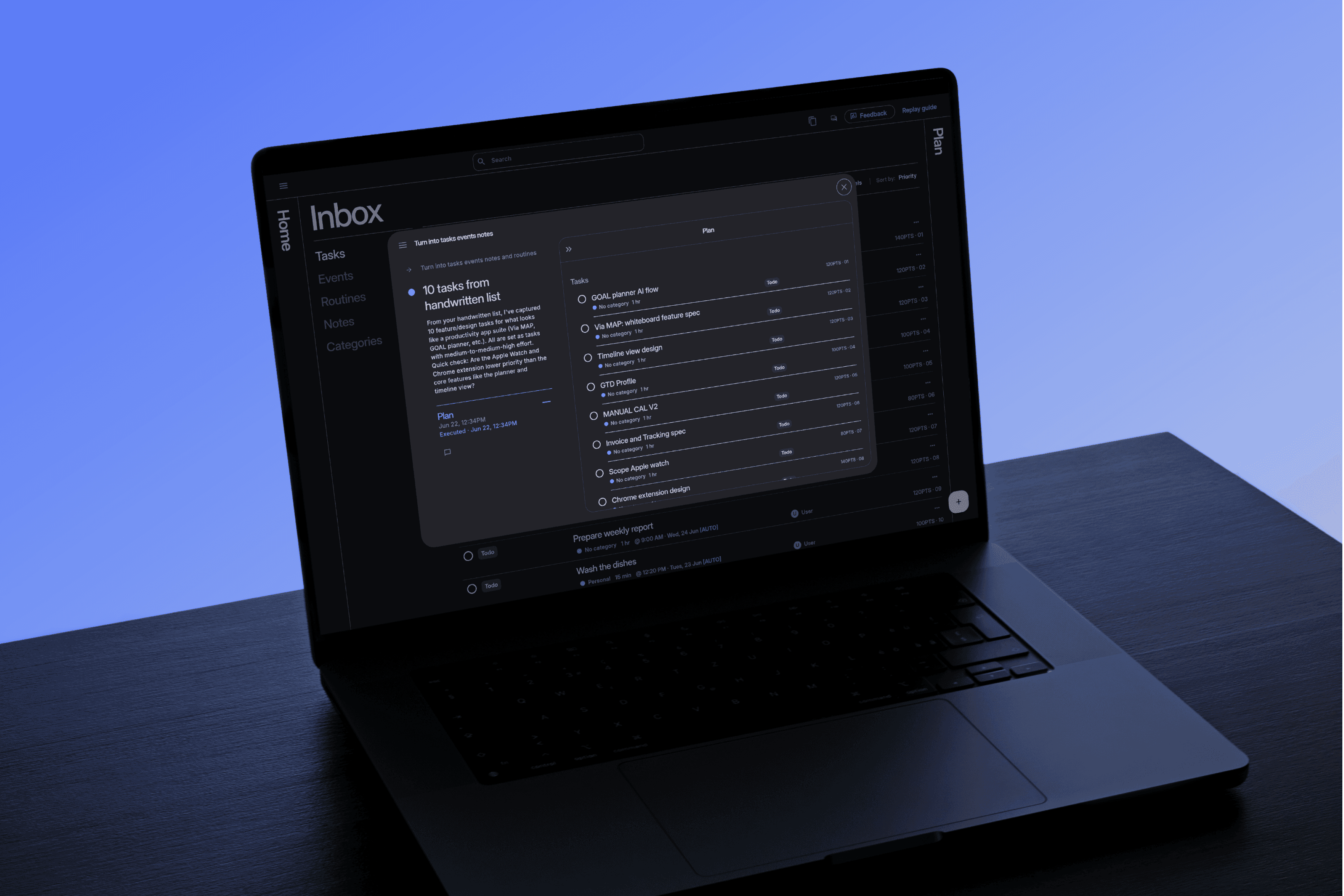
Forget staring at a list and wondering where to start. Via shows you the optimal thing to do right now. One step at a time, in the right order.

Forget staring at a list and wondering where to start. Via shows you the optimal thing to work on. One step at a time, in the right order.

14 day refund · 1 min set up

14 day refund · 1 min set up

The Optimal Path

Through Your Work

Forget staring at a list and wondering where to start. Via shows you the optimal thing to do right now. One step at a time, in the right order.

14 day refund · 1 min set up

Too much to do, no idea where to start & the plan you made didn't survive the day.

Too much to do, no idea where to start & the plan you made didn't survive the day.

Too much to do, no idea where to start, and the plan you made didn't survive the day.

You have too much to do, no idea where to start and the plan you made didn't survive the day.

Your attention is valuable & Via shows you where to invest it.

Your attention is valuable. Don't spend it re-writing a todo list.

Via builds you an optimal schedule around what matters and adapts to changes in your day.

Via builds an optimal schedule around what matters and adapts to changes in your day.

Via captures your work, then builds an optimised schedule around your availability & updates as your day changes.

Capture

You capture your work

Capture your work

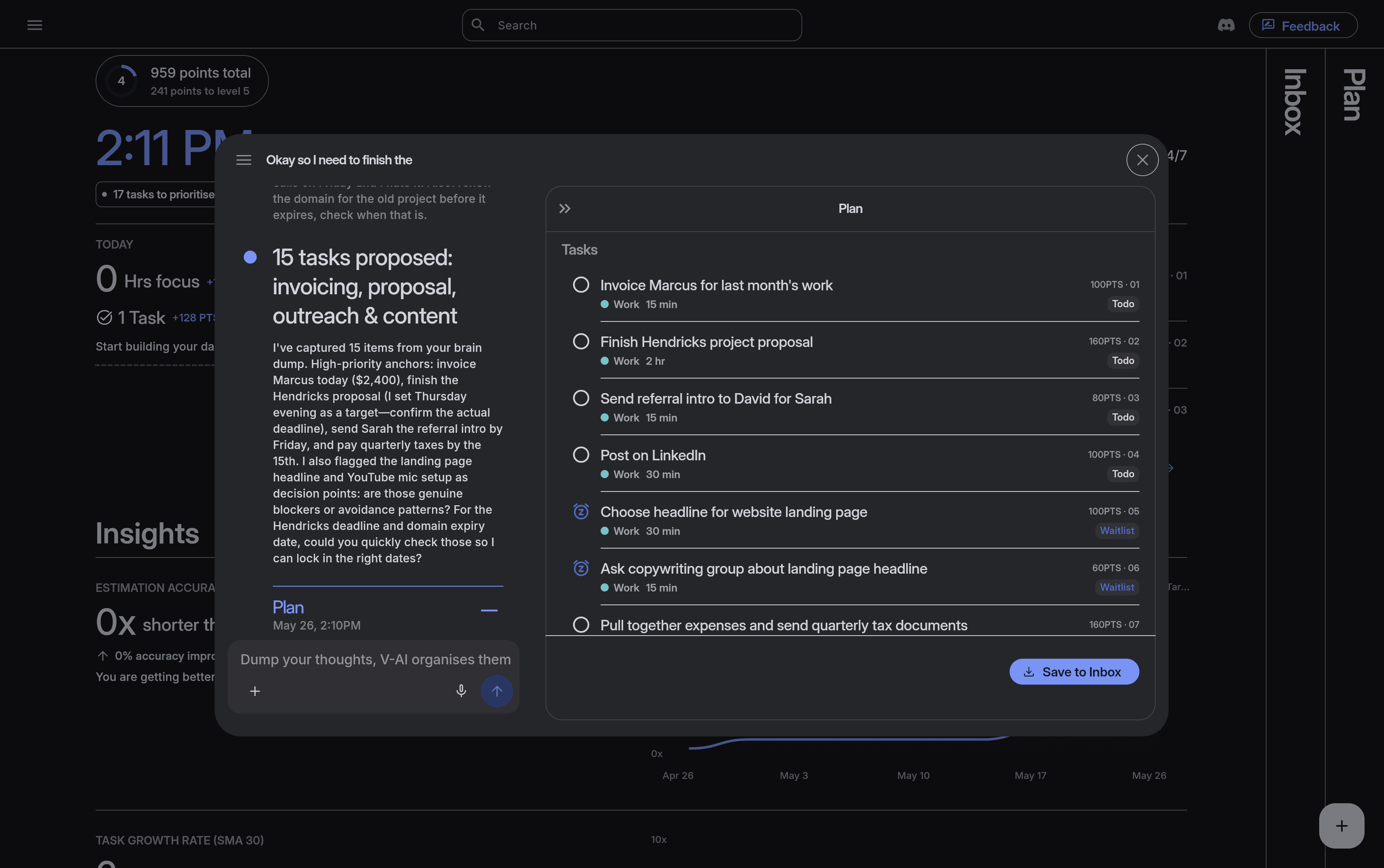
Speak, type, or photograph notes. Via turns them into tasks.

This gets processed into tasks, events, notes and routines.

This gets processed into tasks, events, notes and routines.

01

Prioritise

Your work gets prioritised

Set your priorities

Define what work matters yourself or let Via estimate it for you.

By blending effort, importance, duration, deadline and dependencies together.

By blending effort, importance, duration, deadline and dependencies together.

02

Schedule

Via builds an optimised schedule

Via builds an optimised schedule

Via builds an optimal plan around your priorities, energy, and availability. Edit it anytime.

An auto-scheduling algorithm creates an optimised schedule for you, showing what you need to do one step at a time.

An auto-scheduling algorithm creates an optimised schedule for you, showing what you need to do one step at a time.

03

Execute and adapt

You sit down and execute

You sit down and execute

Do the next best thing. Via adapts when things change.

You’re shown what work is optimal at any moment, and when priorities shift or meetings change the schedule updates.

You’re shown what work is optimal at any moment, and when priorities shift or meetings change the schedule updates.

04

Your attention is valuable Via shows you where to invest it.

What people say

Knowing where to start and what to prioritise is my struggle, choice paralysis is real, Via helps me figure out what the first step is and how to make decisions along the way"

Jack

Founder

Meditreats

Nora

Cáit

Ben

Daniel

What people say

Knowing where to start and what to prioritise is my struggle, choice paralysis is real, Via helps me figure out what the first step is and how to make decisions along the way"

Jack

Founder

Meditreats

Founding members

200+

How it works

01

Capture effortlessly

Capture your work: a voice note, an email thread, a messy list of half-formed ideas. Via turns it into clear tasks, notes, events and routines with estimated priorities.

Capture your work effortlessly
02

Plan Automatically

Via builds an optimised schedule around what matters and how much energy you've got. When a meeting runs late or a deadline moves, your schedule adapts instantly. No manual reshuffling.

Via builds your optimal schedule

03

Get things done

Forget staring at a list wondering where to start. Via always shows you the optimal thing to do right now. One step at a time, in the right order, at the right moment.

Work with direction & gain insight

All features

Auto Planning

01

Logistics-grade auto planner that schedules your tasks automatically and updates instantly to change.

Auto Planning

01

Logistics-grade auto planner that schedules your tasks automatically and updates instantly to change.

Energy-Aware Scheduling

02

Build plans based on your energy and goals with profiles. This tells the autoscheduler how you want the plan to be built.

Energy-Aware Scheduling

02

Build plans based on your energy and goals with profiles. This tells the autoscheduler how you want the plan to be built.

Multi-factor prioritisation

03

A prioritization algorithm that combines all factors involved in deciding what to do first. It ends decision fatigue by showing you your optimal next step, always.

Multi-factor prioritisation

03

A prioritization algorithm that combines all factors involved in deciding what to do first. It ends decision fatigue by showing you your optimal next step, always.

Unified Workspace

04

Store Notes, tasks, events, and routines in one place. Link related items together for instant access and referencing.

Unified Workspace

04

Store Notes, tasks, events, and routines in one place. Link related items together for instant access and referencing.

Time tracking & Insights

05

Track task durations with a focus timer. Gain insight into workload trends, and estimation accuracy. A predictive model automatically adjusts task durations to create realistic, achievable plans.

Time tracking & Insights

05

Track task durations with a focus timer. Gain insight into workload trends, and estimation accuracy. A predictive model automatically adjusts task durations to create realistic, achievable plans.

Plans Made Visual

06

View tasks via Kanban, list, or mapped out spatially on a calendar.

Plans Made Visual

06

View tasks via Kanban, list, or mapped out spatially on a calendar.

Timeblock with Categories

07

Tether your life’s multiple categories together in one space. Define what time windows and what days you can work on different work categories.

Timeblock with Categories

07

Tether your life’s multiple categories together in one space. Define what time windows and what days you can work on different work categories.

Multi-Language Support

08

Work in English, German, French, Brazilian Portuguese, and Spanish.

Multi-Language Support

08

Work in English, German, French, Brazilian Portuguese, and Spanish.

AI Brain dump with Multi-Modal Capture

09

Capture your work by voice, photo, uploading a file, or typing. This content gets automatically transcribed and structured into tasks, notes, events, and routines.

AI Brain dump with Multi-Modal Capture

09

Capture your work by voice, photo, uploading a file, or typing. This content gets automatically transcribed and structured into tasks, notes, events, and routines.

Mobile and Desktop with offline capability

10

Plan effortlessly anywhere and on the go with multi-device compatibility that works offline too.

Mobile and Desktop with offline capability

10

Plan effortlessly anywhere and on the go with multi-device compatibility that works offline too.

Calendar Integration

11

Google Calendar integration, with many more on the way.

Calendar Integration

11

Google Calendar integration, with many more on the way.

MCP Integration

11

MCP integration with your favourite AI

MCP Integration

11

MCP integration with your favourite AI

Pay once then never again

Get a lifetime licence for a limited time only

Lifetime Deal

Basic

Good for people who need to capture thoughts before they vanish and stay on track with work.

$99.99

Once

14 day money back guarantee

Includes

AI brain dump

Auto scheduler & optimisation

Smart prioritisation

Categories & Labels

Focus mode & Insights

Timeslots

Tasks, Events, Routines & Notes

iOS App

Calendar integration

Pro

For solo-operators who need to balance their time between clients and personal life.

$129.99

Once

14 day money back guarantee

Includes

Everything in Basic

Task dependencies

MCP Integration

BYOK

API access

Unlimited workspaces

Pro Team

For teams who need to distribute workload and utilise time more effectively .

$399.99

Once

14 day money back guarantee

Includes

Everything in Pro

Teams & Collaboration

6 Members

Additional members

+5 Seats

$199.99

Once

Compare Features

Plan

Basic

Pro

Pro Team

Members

01

01

06

Auto-Scheduler

Multi factor prioritisation

Timeslots

Categories

Labels

AI Brain Dump

Tasks

Events

Routines

Notes

Focus mode

Tracking & Insights

iOS App & Widgets

Multilingual support

Core upgrades

Relations

Workspaces

Task Dependencies

MCP

BYOK

API

Teams

Lifetime licence details

Community-lead development

LTD members get priority feedback channels and help shape the roadmap.

Upgrading your tier

Move up a tier during the deal period and just pay the difference. Same deal discounts apply.

Community perks

License holders get access to giveaways and promos not available to anyone else.

Access to feature upgrades

Every improvement we ship to your tier’s existing features is included free, forever.

New features & ad-ons

License holders always get early access to add major new releases at a one-time discounted price.

Grow with the product

Whichever tier you start on, you’re never locked out of where Via goes next.

Pay once then never again

Get a lifetime licence for a limited time only

Lifetime Deal

Basic

Good for people who need to capture thoughts before they vanish and stay on track with work.

$99.99

Once

14 day money back guarantee

Includes

AI brain dump

Auto scheduler & optimisation

Smart prioritisation

Categories & Labels

Focus mode & Insights

Timeslots

Tasks, Events, Routines & Notes

iOS App

Calendar integration

Pro

For solo-operators who need to balance their time between clients and personal life.

$129.99

Once

14 day money back guarantee

Includes

Everything in Basic

Task dependencies

MCP Integration

BYOK

API access

Unlimited workspaces

Pro Team

For teams who need to distribute workload and utilise time more effectively .

$399.99

Once

14 day money back guarantee

Includes

Everything in Pro

Teams & Collaboration

6 Members

Additional members

+5 Seats

$199.99

Once

Compare Features

Plan

Basic

Pro

Pro Team

Members

01

01

06

Auto-Scheduler

Multi factor prioritisation

Timeslots

Categories

Labels

AI Brain Dump

Tasks

Events

Routines

Notes

Focus mode

Tracking & Insights

iOS App & Widgets

Multilingual support

Core upgrades

Relations

Workspaces

Task Dependencies

MCP

BYOK

API

Teams

Lifetime licence details

Community-lead development

LTD members get priority feedback channels and help shape the roadmap.

Upgrading your tier

Move up a tier during the deal period and just pay the difference. Same deal discounts apply.

Community perks

License holders get access to giveaways and promos not available to anyone else.

Access to feature upgrades

Every improvement we ship to your tier’s existing features is included free, forever.

New features & ad-ons

License holders always get early access to add major new releases at a one-time discounted price.

Grow with the product

Whichever tier you start on, you’re never locked out of where Via goes next.

Pay once then never again

Get a lifetime licence for a limited time only

14 day refund period

Lifetime Deal

Basic

$99.99

Once

14 day money back guarantee

Good for people who need to capture thoughts before they vanish and stay on track with work.

Includes

Auto scheduler & optimisation

Smart prioritisation

Categories & Labels

Focus mode & Insights

Timeslots

Tasks, Events, Routines & Notes

iOS App

Calendar integration

Pro

$129.99

Once

14 day money back guarantee

For solo-operators who need to balance their time between clients and personal life.

Everything in Basic

Task dependencies

MCP Integration

BYOK

API access

Unlimited workspaces

Includes

Pro Team

$399.99

Once

14 day money back guarantee

Good for teams who need to distribute workload and utilise time more effectively.

Everything in Pro

Teams & Collaboration

6 Members

Includes

$199.99

Once

+5 Seats

Add more team members for a one time price.

Additional members

Compare Features

Plan

Basic

Pro

Pro Team

Members

01

01

06

Auto-Scheduler

Prioritisation

Categories

Timeslots

AI Brain Dump

Tasks

Events

Notes

Routines

Focus mode

Tracking & Insights

iOS App

Dependencies

MCP

Core upgrades

BYOK

API

Workspaces

Teams

Lifetime licence details

Community-lead development

LTD members get priority feedback channels and help shape the roadmap.

Upgrading your tier

Move up a tier during the deal period and just pay the difference. Same deal discounts apply.

Community perks

License holders get access to giveaways and promos not available to anyone else.

Access to feature upgrades

Every improvement we ship to your tier’s existing features is included free, forever.

New features & ad-ons

License holders always get early access to add major new releases at a one-time discounted price.

Grow with the product

Whichever tier you start on, you’re never locked out of where Via goes next.

01

Capture your work: a voice note, an email thread, a messy list of half-formed ideas. Via turns it into clear tasks, notes, events and routines with estimated priorities.

Capture your work effortlessly

02

Via builds an optimised schedule around what matters and how much energy you've got. When a meeting runs late or a deadline moves, your schedule adapts instantly. No manual reshuffling.

Via builds an optimised schedule

03

Forget staring at a list wondering where to start. Via always shows you the optimal thing to do right now. One step at a time, in the right order, at the right moment.

Start working with direction & gain insight.

Frequently asked questions

What does the plan include — are there any limits?

What does the plan include are there any limits?

How does Via handle multiple areas of my life?

How does the brain dump feature actually work?

Is my data private? Does Via train on it?

Is there a mobile app?

How many devices can I use?

Does it integrate with Google Calendar or Outlook?

Can I use Via with my team?

Can I run multiple workspaces from one account?

Can I bring my own API key (BYOK)?

Is there an API, webhooks, or MCP support?

How is Via different from other planning tools?

What AI model does Via use?

Is there a refund policy?

Subscribe to our newsletter

A product of: Daton Software Limited

Company No: 793501

The Hatch Lab, M11 Business Campus,

Gorey, Ireland, Y25 A8H2

Subscribe to our newsletter

A product of: Daton Software Limited

Company No: 793501

The Hatch Lab,

M11 Business Campus,

Gorey, Ireland

Y25 A8H2