The Optimal Path

Through Your Work

Forget staring at a list and wondering where to start. Via shows you the optimal thing to do right now. One step at a time, in the right order.

Forget staring at a list and wondering where to start. Via shows you the optimal thing to work on. One step at a time, in the right order.

14 day refund · 1 min set up

14 day refund · 1 min set up

The Optimal Path

Through Your Work

Forget staring at a list and wondering where to start. Via shows you the optimal thing to do right now. One step at a time, in the right order.

14 day refund · 1 min set up

Via 1.0 - Find the optimal path through your work | Product Hunt
Jake
Jake

"<p>Great software for visual thinkers, ADHDers, or folks who value smart scheduling software. I've used this software for a few months now, and it's definitely helpful in scheduling my days &amp; weeks. Via breaks down some of my loftier goals and helps me both break down the tasks &amp; schedule them into actual time slots in my calendar, greatly increasing my follow-through. Time blocking is tough for ADHDers, but this makes it easier &amp; more flexible, as it is very adaptable to my needs. I really appreciate that it has MCP as well, so I can have Claude import tasks or chats into VIA to be processed. This is truly a smart team! I like that they are Irish as well, one of my favorite accents. Helpful that Ireland is very tech, business &amp; finance-friendly as well, so that gives me extra confidence in their team</p><p><br></p>"

Darek Latawski
Darek Latawski

"<p>Via is the first one that feels like it was built around how I actually think. I dump everything in my head into it, half-formed and out of order, and it auto-categorizes it, figures out dependencies between tasks I didn't even spell out, re-sorts priorities, and estimates how long things will actually take. I'm not organizing anymore, I'm just offloading, and the system does the organizing.</p><p>The AI integration is where it really separates itself. It's not just taking whatever I give it and filing it away. I can actually talk to it about my schedule, tell it something's changed, ask it to reconsider how things are laid out, and it responds like it's actually listening rather than just executing a command. It's less like a tool and more like an assistant that hears what you're saying and has the ability to make sense of it and act on it.</p>"

Lindi Sopaj
Lindi Sopaj

"<p>I work in a marketing inhouse for a company where there's a mix of ongoing projects that I can work on whenever, that I fully control myself, and daily tasks or "orders" from other colleagues within the company such as website fix, ads questions, etc, these usually need to be completed within 48h. <br><br>As a person with literally 0 structure except having everything in my head Via has been a great. One can only keep working as I did for so long until the brain says no. My issue was I had so many tasks that I didnt know where to start and finish my days since I had so many tasks piled up. So I just randomly did them based on what was most burning in the moment. This left some tasks untouched for weeks and also created brain fog and a feeling of being overwhelmed. <br><br>I moved from Asana to Via, or rather I use them both but mostly Via, in a way where Via has been great at creating a daily schedule for me so I know what I can and should do. It also motivates me to complete tasks and seeing that visually. As for the daily orders we get that can vary a lot from day to day, I simply put it in the schedule either manually or brain dump. <br><br>I'm sure I can get more out of the tool but I've been a bit lazy with exploring everything. </p>"

Jake
Jake

"<p>Great software for visual thinkers, ADHDers, or folks who value smart scheduling software. I've used this software for a few months now, and it's definitely helpful in scheduling my days &amp; weeks. Via breaks down some of my loftier goals and helps me both break down the tasks &amp; schedule them into actual time slots in my calendar, greatly increasing my follow-through. Time blocking is tough for ADHDers, but this makes it easier &amp; more flexible, as it is very adaptable to my needs. I really appreciate that it has MCP as well, so I can have Claude import tasks or chats into VIA to be processed. This is truly a smart team! I like that they are Irish as well, one of my favorite accents. Helpful that Ireland is very tech, business &amp; finance-friendly as well, so that gives me extra confidence in their team</p><p><br></p>"

Darek Latawski
Darek Latawski

"<p>Via is the first one that feels like it was built around how I actually think. I dump everything in my head into it, half-formed and out of order, and it auto-categorizes it, figures out dependencies between tasks I didn't even spell out, re-sorts priorities, and estimates how long things will actually take. I'm not organizing anymore, I'm just offloading, and the system does the organizing.</p><p>The AI integration is where it really separates itself. It's not just taking whatever I give it and filing it away. I can actually talk to it about my schedule, tell it something's changed, ask it to reconsider how things are laid out, and it responds like it's actually listening rather than just executing a command. It's less like a tool and more like an assistant that hears what you're saying and has the ability to make sense of it and act on it.</p>"

Lindi Sopaj
Lindi Sopaj

"<p>I work in a marketing inhouse for a company where there's a mix of ongoing projects that I can work on whenever, that I fully control myself, and daily tasks or "orders" from other colleagues within the company such as website fix, ads questions, etc, these usually need to be completed within 48h. <br><br>As a person with literally 0 structure except having everything in my head Via has been a great. One can only keep working as I did for so long until the brain says no. My issue was I had so many tasks that I didnt know where to start and finish my days since I had so many tasks piled up. So I just randomly did them based on what was most burning in the moment. This left some tasks untouched for weeks and also created brain fog and a feeling of being overwhelmed. <br><br>I moved from Asana to Via, or rather I use them both but mostly Via, in a way where Via has been great at creating a daily schedule for me so I know what I can and should do. It also motivates me to complete tasks and seeing that visually. As for the daily orders we get that can vary a lot from day to day, I simply put it in the schedule either manually or brain dump. <br><br>I'm sure I can get more out of the tool but I've been a bit lazy with exploring everything. </p>"

Too much to do, no idea where to start & the plan you made didn't survive the day.

Too much to do, no idea where to start & the plan you made didn't survive the day.

Too much to do, no idea where to start, and the plan you made didn't survive the day.

You have too much to do, no idea where to start and the plan you made didn't survive the day.

Your attention is valuable & Via shows you where to invest it.

Your attention is valuable. Don't spend it re-writing a todo list.

Via builds you an optimal schedule around what matters and adapts to changes in your day.

Via builds an optimal schedule around what matters and adapts to changes in your day.

Via captures your work, then builds an optimised schedule around your availability & updates as your day changes.

Capture

You capture your work

Capture your work

Speak, type, or photograph notes. Via turns them into tasks.

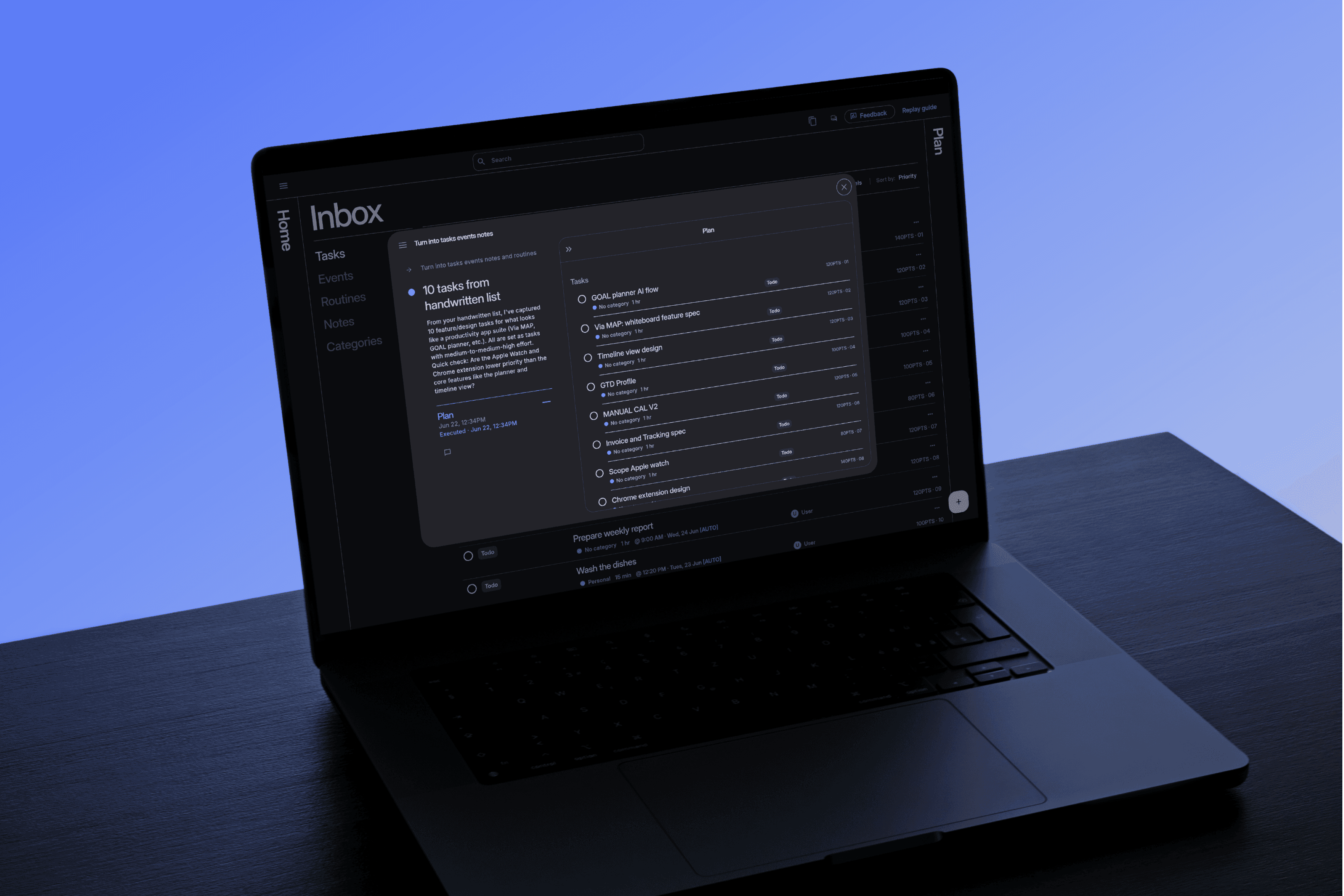
This gets processed into tasks, events, notes and routines.

This gets processed into tasks, events, notes and routines.

01

Prioritise

Your work gets prioritised

Set your priorities

Define what work matters yourself or let Via estimate it for you.

By blending effort, importance, duration, deadline and dependencies together.

By blending effort, importance, duration, deadline and dependencies together.

02

Schedule

Via builds an optimised schedule

Via builds an optimised schedule

Via builds an optimal plan around your priorities, energy, and availability. Edit it anytime.

An auto-scheduling algorithm creates an optimised schedule for you, showing what you need to do one step at a time.

An auto-scheduling algorithm creates an optimised schedule for you, showing what you need to do one step at a time.

03

Execute and adapt

You sit down and execute

You sit down and execute

Do the next best thing. Via adapts when things change.

You’re shown what work is optimal at any moment, and when priorities shift or meetings change the schedule updates.

You’re shown what work is optimal at any moment, and when priorities shift or meetings change the schedule updates.

04

Your attention is valuable Via shows you where to invest it.

How it works

01

Capture effortlessly

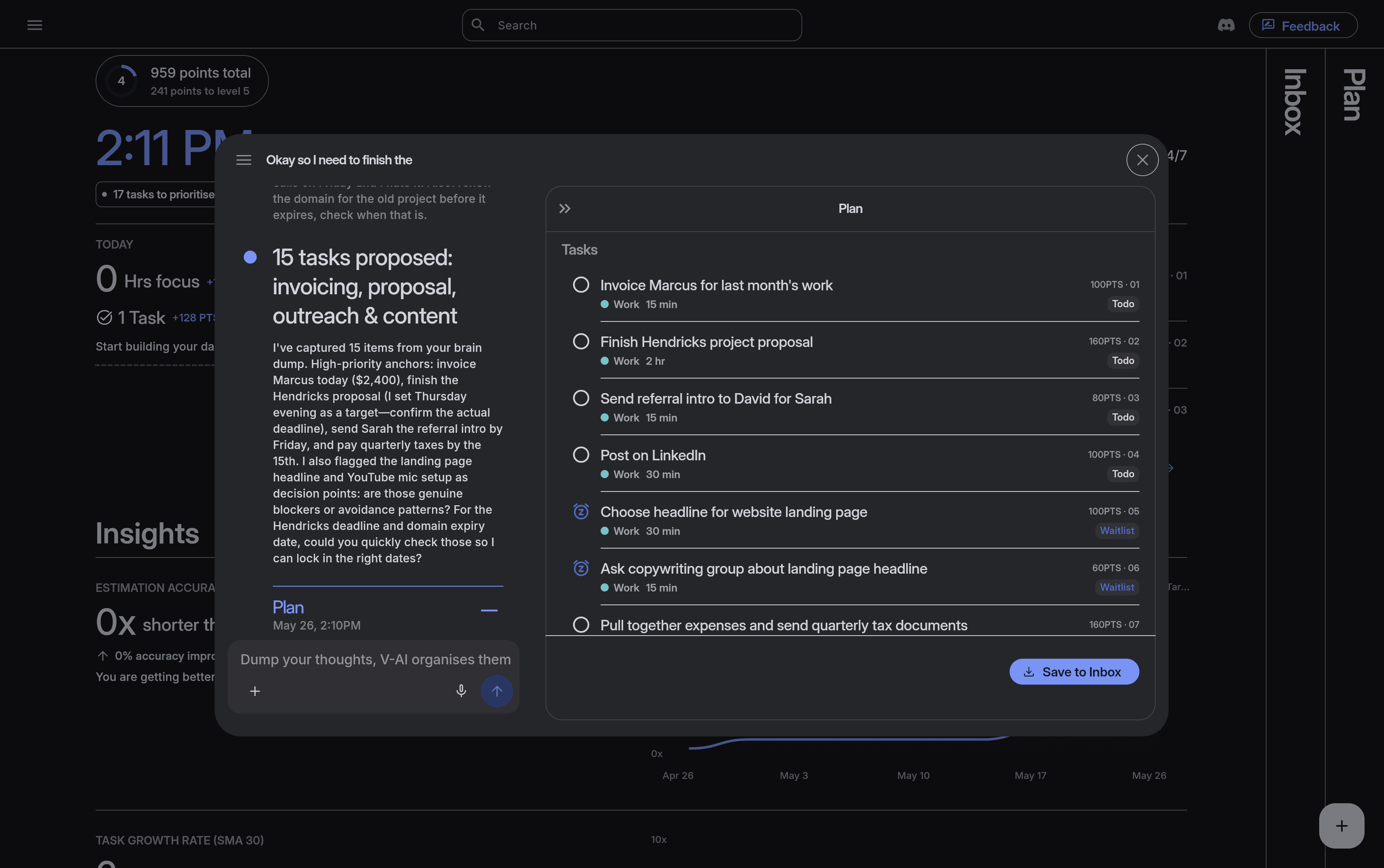
Capture your work: a voice note, an email thread, a messy list of half-formed ideas. Via turns it into clear tasks, notes, events and routines with estimated priorities.

Capture your work effortlessly
02

Plan Automatically

Via builds an optimised schedule around what matters and how much energy you've got. When a meeting runs late or a deadline moves, your schedule adapts instantly. No manual reshuffling.

Via builds your optimal schedule

03

Get things done

Forget staring at a list wondering where to start. Via always shows you the optimal thing to do right now. One step at a time, in the right order, at the right moment.

Work with direction & gain insight

All features

Auto Planning

01

Logistics-grade auto planner that schedules your tasks automatically and updates instantly to change.

Auto Planning

01

Logistics-grade auto planner that schedules your tasks automatically and updates instantly to change.

Energy-Aware Scheduling

02

Build plans based on your energy and goals with profiles. This tells the autoscheduler how you want the plan to be built.

Energy-Aware Scheduling

02

Build plans based on your energy and goals with profiles. This tells the autoscheduler how you want the plan to be built.

Multi-factor prioritisation

03

A prioritization algorithm that combines all factors involved in deciding what to do first. It ends decision fatigue by showing you your optimal next step, always.

Multi-factor prioritisation

03

A prioritization algorithm that combines all factors involved in deciding what to do first. It ends decision fatigue by showing you your optimal next step, always.

Unified Workspace

04

Store Notes, tasks, events, and routines in one place. Link related items together for instant access and referencing.

Unified Workspace

04

Store Notes, tasks, events, and routines in one place. Link related items together for instant access and referencing.

Time tracking & Insights

05

Track task durations with a focus timer. Gain insight into workload trends, and estimation accuracy. A predictive model automatically adjusts task durations to create realistic, achievable plans.

Time tracking & Insights

05

Track task durations with a focus timer. Gain insight into workload trends, and estimation accuracy. A predictive model automatically adjusts task durations to create realistic, achievable plans.

Plans Made Visual

06

View tasks via Kanban, list, or mapped out spatially on a calendar.

Plans Made Visual

06

View tasks via Kanban, list, or mapped out spatially on a calendar.

Timeblock with Categories

07

Tether your life’s multiple categories together in one space. Define what time windows and what days you can work on different work categories.

Timeblock with Categories

07

Tether your life’s multiple categories together in one space. Define what time windows and what days you can work on different work categories.

Multi-Language Support

08

Work in English, German, French, Brazilian Portuguese, and Spanish.

Multi-Language Support

08

Work in English, German, French, Brazilian Portuguese, and Spanish.

AI Brain dump with Multi-Modal Capture

09

Capture your work by voice, photo, uploading a file, or typing. This content gets automatically transcribed and structured into tasks, notes, events, and routines.

AI Brain dump with Multi-Modal Capture

09

Capture your work by voice, photo, uploading a file, or typing. This content gets automatically transcribed and structured into tasks, notes, events, and routines.

Mobile and Desktop with offline capability

10

Plan effortlessly anywhere and on the go with multi-device compatibility that works offline too.

Mobile and Desktop with offline capability

10

Plan effortlessly anywhere and on the go with multi-device compatibility that works offline too.

Calendar Integration

11

Google Calendar integration, with many more on the way.

Calendar Integration

11

Google Calendar integration, with many more on the way.

MCP Integration

11

MCP integration with your favourite AI

MCP Integration

11

MCP integration with your favourite AI

Via 1.0 - Find the optimal path through your work | Product Hunt
Jake
Jake

"<p>Great software for visual thinkers, ADHDers, or folks who value smart scheduling software. I've used this software for a few months now, and it's definitely helpful in scheduling my days &amp; weeks. Via breaks down some of my loftier goals and helps me both break down the tasks &amp; schedule them into actual time slots in my calendar, greatly increasing my follow-through. Time blocking is tough for ADHDers, but this makes it easier &amp; more flexible, as it is very adaptable to my needs. I really appreciate that it has MCP as well, so I can have Claude import tasks or chats into VIA to be processed. This is truly a smart team! I like that they are Irish as well, one of my favorite accents. Helpful that Ireland is very tech, business &amp; finance-friendly as well, so that gives me extra confidence in their team</p><p><br></p>"

Darek Latawski
Darek Latawski

"<p>Via is the first one that feels like it was built around how I actually think. I dump everything in my head into it, half-formed and out of order, and it auto-categorizes it, figures out dependencies between tasks I didn't even spell out, re-sorts priorities, and estimates how long things will actually take. I'm not organizing anymore, I'm just offloading, and the system does the organizing.</p><p>The AI integration is where it really separates itself. It's not just taking whatever I give it and filing it away. I can actually talk to it about my schedule, tell it something's changed, ask it to reconsider how things are laid out, and it responds like it's actually listening rather than just executing a command. It's less like a tool and more like an assistant that hears what you're saying and has the ability to make sense of it and act on it.</p>"

Lindi Sopaj
Lindi Sopaj

"<p>I work in a marketing inhouse for a company where there's a mix of ongoing projects that I can work on whenever, that I fully control myself, and daily tasks or "orders" from other colleagues within the company such as website fix, ads questions, etc, these usually need to be completed within 48h. <br><br>As a person with literally 0 structure except having everything in my head Via has been a great. One can only keep working as I did for so long until the brain says no. My issue was I had so many tasks that I didnt know where to start and finish my days since I had so many tasks piled up. So I just randomly did them based on what was most burning in the moment. This left some tasks untouched for weeks and also created brain fog and a feeling of being overwhelmed. <br><br>I moved from Asana to Via, or rather I use them both but mostly Via, in a way where Via has been great at creating a daily schedule for me so I know what I can and should do. It also motivates me to complete tasks and seeing that visually. As for the daily orders we get that can vary a lot from day to day, I simply put it in the schedule either manually or brain dump. <br><br>I'm sure I can get more out of the tool but I've been a bit lazy with exploring everything. </p>"

Jake
Jake

"<p>Great software for visual thinkers, ADHDers, or folks who value smart scheduling software. I've used this software for a few months now, and it's definitely helpful in scheduling my days &amp; weeks. Via breaks down some of my loftier goals and helps me both break down the tasks &amp; schedule them into actual time slots in my calendar, greatly increasing my follow-through. Time blocking is tough for ADHDers, but this makes it easier &amp; more flexible, as it is very adaptable to my needs. I really appreciate that it has MCP as well, so I can have Claude import tasks or chats into VIA to be processed. This is truly a smart team! I like that they are Irish as well, one of my favorite accents. Helpful that Ireland is very tech, business &amp; finance-friendly as well, so that gives me extra confidence in their team</p><p><br></p>"

Darek Latawski
Darek Latawski

"<p>Via is the first one that feels like it was built around how I actually think. I dump everything in my head into it, half-formed and out of order, and it auto-categorizes it, figures out dependencies between tasks I didn't even spell out, re-sorts priorities, and estimates how long things will actually take. I'm not organizing anymore, I'm just offloading, and the system does the organizing.</p><p>The AI integration is where it really separates itself. It's not just taking whatever I give it and filing it away. I can actually talk to it about my schedule, tell it something's changed, ask it to reconsider how things are laid out, and it responds like it's actually listening rather than just executing a command. It's less like a tool and more like an assistant that hears what you're saying and has the ability to make sense of it and act on it.</p>"

Lindi Sopaj
Lindi Sopaj

"<p>I work in a marketing inhouse for a company where there's a mix of ongoing projects that I can work on whenever, that I fully control myself, and daily tasks or "orders" from other colleagues within the company such as website fix, ads questions, etc, these usually need to be completed within 48h. <br><br>As a person with literally 0 structure except having everything in my head Via has been a great. One can only keep working as I did for so long until the brain says no. My issue was I had so many tasks that I didnt know where to start and finish my days since I had so many tasks piled up. So I just randomly did them based on what was most burning in the moment. This left some tasks untouched for weeks and also created brain fog and a feeling of being overwhelmed. <br><br>I moved from Asana to Via, or rather I use them both but mostly Via, in a way where Via has been great at creating a daily schedule for me so I know what I can and should do. It also motivates me to complete tasks and seeing that visually. As for the daily orders we get that can vary a lot from day to day, I simply put it in the schedule either manually or brain dump. <br><br>I'm sure I can get more out of the tool but I've been a bit lazy with exploring everything. </p>"

Pay once then never again

Lifetime Deal

Basic

Good for people who need to capture thoughts before they vanish and stay on track with work.

$99.99

Once

14 day money back guarantee

Includes

AI brain dump

Auto scheduler & optimisation

Smart prioritisation

Categories & Labels

Focus mode & Insights

Timeslots

Tasks, Events, Routines & Notes

iOS App

Calendar integration

Pro

For solo-operators who need to balance their time between clients and personal life.

$129.99

Once

14 day money back guarantee

Includes

Everything in Basic

Task dependencies

MCP Integration

BYOK

API access

Unlimited workspaces

Pro Team

For teams who need to distribute workload and utilise time more effectively .

$399.99

Once

14 day money back guarantee

Includes

Everything in Pro

Teams & Collaboration

6 Members

Additional members

+5 Seats

$199.99

Once

Compare Features

Plan

Basic

Pro

Pro Team

Members

01

01

06

Auto-Scheduler

Multi factor prioritisation

Timeslots

Categories

Labels

AI Brain Dump

Tasks

Events

Routines

Notes

Focus mode

Tracking & Insights

iOS App & Widgets

Multilingual support

Core upgrades

Relations

Workspaces

Task Dependencies

MCP

BYOK

API

Teams

Lifetime licence details

Community-lead development

LTD members get priority feedback channels and help shape the roadmap.

Upgrading your tier

Move up a tier during the deal period and just pay the difference. Same deal discounts apply.

Community perks

License holders get access to giveaways and promos not available to anyone else.

Access to feature upgrades

Every improvement we ship to your tier’s existing features is included free, forever.

New features & ad-ons

License holders always get early access to add major new releases at a one-time discounted price.

Grow with the product

Whichever tier you start on, you’re never locked out of where Via goes next.

Pay once then never again

Lifetime Deal

Basic

Good for people who need to capture thoughts before they vanish and stay on track with work.

$99.99

Once

14 day money back guarantee

Includes

AI brain dump

Auto scheduler & optimisation

Smart prioritisation

Categories & Labels

Focus mode & Insights

Timeslots

Tasks, Events, Routines & Notes

iOS App

Calendar integration

Pro

For solo-operators who need to balance their time between clients and personal life.

$129.99

Once

14 day money back guarantee

Includes

Everything in Basic

Task dependencies

MCP Integration

BYOK

API access

Unlimited workspaces

Pro Team

For teams who need to distribute workload and utilise time more effectively .

$399.99

Once

14 day money back guarantee

Includes

Everything in Pro

Teams & Collaboration

6 Members

Additional members

+5 Seats

$199.99

Once

Compare Features

Plan

Basic

Pro

Pro Team

Members

01

01

06

Auto-Scheduler

Multi factor prioritisation

Timeslots

Categories

Labels

AI Brain Dump

Tasks

Events

Routines

Notes

Focus mode

Tracking & Insights

iOS App & Widgets

Multilingual support

Core upgrades

Relations

Workspaces

Task Dependencies

MCP

BYOK

API

Teams

Lifetime licence details

Community-lead development

LTD members get priority feedback channels and help shape the roadmap.

Upgrading your tier

Move up a tier during the deal period and just pay the difference. Same deal discounts apply.

Community perks

License holders get access to giveaways and promos not available to anyone else.

Access to feature upgrades

Every improvement we ship to your tier’s existing features is included free, forever.

New features & ad-ons

License holders always get early access to add major new releases at a one-time discounted price.

Grow with the product

Whichever tier you start on, you’re never locked out of where Via goes next.

Pay once then never again

Lifetime Deal

Basic

$99.99

Once

14 day money back guarantee

Good for people who need to capture thoughts before they vanish and stay on track with work.

Includes

Auto scheduler & optimisation

Smart prioritisation

Categories & Labels

Focus mode & Insights

Timeslots

Tasks, Events, Routines & Notes

iOS App

Calendar integration

Pro

$129.99

Once

14 day money back guarantee

For solo-operators who need to balance their time between clients and personal life.

Everything in Basic

Task dependencies

MCP Integration

BYOK

API access

Unlimited workspaces

Includes

Pro Team

$399.99

Once

14 day money back guarantee

Good for teams who need to distribute workload and utilise time more effectively.

Everything in Pro

Teams & Collaboration

6 Members

Includes

$199.99

Once

+5 Seats

Add more team members for a one time price.

Additional members

Compare Features

Plan

Basic

Pro

Pro Team

Members

01

01

06

Auto-Scheduler

Prioritisation

Categories

Timeslots

AI Brain Dump

Tasks

Events

Notes

Routines

Focus mode

Tracking & Insights

iOS App

Dependencies

MCP

Core upgrades

BYOK

API

Workspaces

Teams

Lifetime licence details

Community-lead development

LTD members get priority feedback channels and help shape the roadmap.

Upgrading your tier

Move up a tier during the deal period and just pay the difference. Same deal discounts apply.

Community perks

License holders get access to giveaways and promos not available to anyone else.

Access to feature upgrades

Every improvement we ship to your tier’s existing features is included free, forever.

New features & ad-ons

License holders always get early access to add major new releases at a one-time discounted price.

Grow with the product

Whichever tier you start on, you’re never locked out of where Via goes next.

01

Capture your work: a voice note, an email thread, a messy list of half-formed ideas. Via turns it into clear tasks, notes, events and routines with estimated priorities.

Capture your work effortlessly

02

Via builds an optimised schedule around what matters and how much energy you've got. When a meeting runs late or a deadline moves, your schedule adapts instantly. No manual reshuffling.

Via builds an optimised schedule

03

Forget staring at a list wondering where to start. Via always shows you the optimal thing to do right now. One step at a time, in the right order, at the right moment.

Start working with direction & gain insight.

Frequently asked questions

What does the plan include — are there any limits?

What does the plan include are there any limits?

How does Via handle multiple areas of my life?

How does the brain dump feature actually work?

Is my data private? Does Via train on it?

Is there a mobile app?

How many devices can I use?

Does it integrate with Google Calendar or Outlook?

Can I use Via with my team?

Can I run multiple workspaces from one account?

Can I bring my own API key (BYOK)?

Is there an API, webhooks, or MCP support?

How is Via different from other planning tools?

What AI model does Via use?

Is there a refund policy?

Subscribe to our newsletter

A product of: Daton Software Limited

Company No: 793501

The Hatch Lab, M11 Business Campus,

Gorey, Ireland, Y25 A8H2

Subscribe to our newsletter

A product of: Daton Software Limited

Company No: 793501

The Hatch Lab,

M11 Business Campus,

Gorey, Ireland

Y25 A8H2